How to Set Up a Status Page in 5 Minutes (Step-by-Step)
Step-by-step guide to setting up a free status page with FoundersDeck. Custom domain, branding, and monitor integration — live in under 5 minutes.
A status page is one of those things every SaaS should have but most founders put off. “I’ll set it up later.” “It’s not urgent.” “Nobody’s asking for it yet.”
Until your service goes down and 50 users email you asking what’s happening.
The good news: setting up a status page takes less time than reading this intro. Here’s how to go from zero to live status page in under 5 minutes with FoundersDeck.
What You’ll Have at the End
- A public status page showing real-time uptime status of your services
- Automatic incident detection — no manual posting required
- Uptime history bars showing the last 90 days
- Your branding (name, colors)
- A shareable URL you can send to users
- Optional: custom domain (e.g.,
status.yourdomain.com)
Let’s go.
Step 1: Create Your Free Account
Go to foundersdeck.dev/register and create an account. No credit card required — the free plan includes everything you need for a basic status page.
You’ll need:
- Email address
- Password
That’s it. No company name, no phone number, no onboarding quiz.
Step 2: Add Your Monitors
Once you’re in the dashboard, click “Add Monitor” and enter:
- URL — the endpoint you want to monitor (e.g.,
https://yourdomain.com) - Name — a human-readable label (e.g., “Main Website”)
- Check type — HTTP, Ping, or Keyword
- Interval — how often to check (5 minutes on free tier)
Add monitors for each service you want to show on your status page. The free tier includes 5 monitors — that’s usually enough for:
- Your main website
- Your API
- Your app/dashboard
- Your documentation
- Your blog or marketing site
Step 3: Create Your Status Page
Navigate to Status Pages and click “Create Status Page”. You’ll configure:
- Title — your company or product name
- Slug — the URL path (e.g.,
your-company→foundersdeck.dev/status/your-company) - Primary color — matches your brand
- Monitors — select which monitors to display
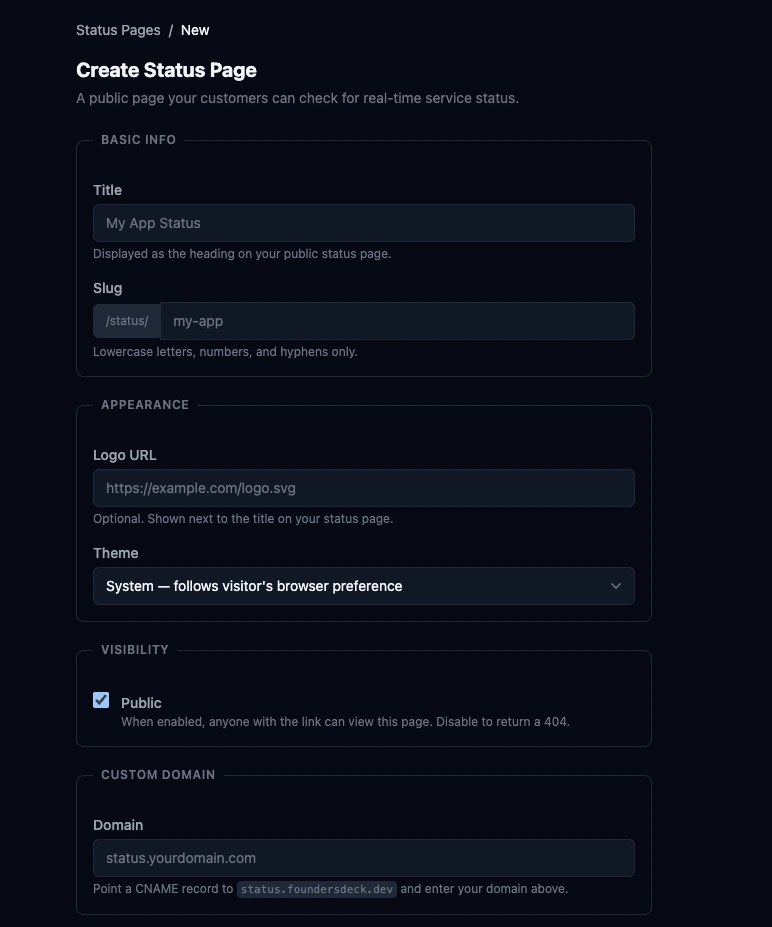
Click save, and your status page is live. That’s it.
Step 4: Check Your Live Status Page
Want to see what the end result looks like? Here’s our own: status.foundersdeck.dev — built with FoundersDeck, monitoring FoundersDeck.
Open the URL and you’ll see:
- Each monitored service with its current status (operational, degraded, or down)
- Uptime bars showing the last 90 days of history
- Any active incidents with details
- Your branding and colors
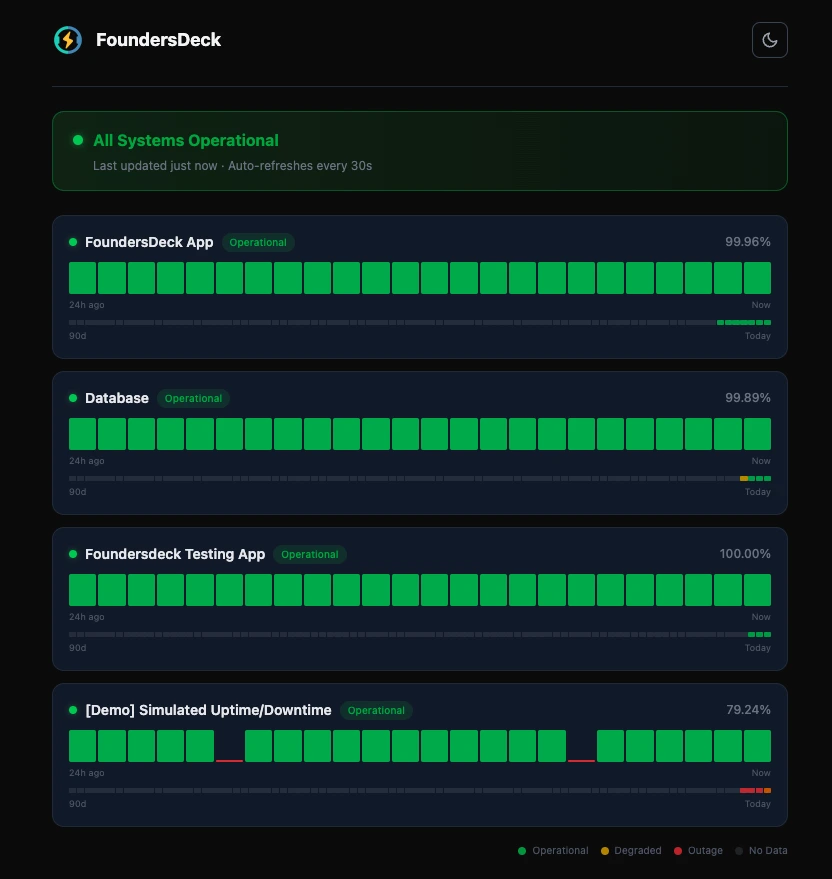
The status page updates automatically. When FoundersDeck detects an incident, it appears on the status page immediately — no manual intervention needed.
Important: FoundersDeck status pages use zero cookies and zero tracking scripts. Your users won’t see a consent banner, and you’re not adding any third-party requests to the page. This is by design.
Optional: Custom Domain
On paid plans (starting at €9/month), you can use your own domain for the status page:
- Go to your status page settings
- Enter your custom domain (e.g.,
status.yourdomain.com) - Add a CNAME record in your DNS pointing to FoundersDeck
- Save — SSL is automatically provisioned
Your users can now access your status page at status.yourdomain.com.
Optional: Add an Uptime Badge
FoundersDeck provides embeddable SVG uptime badges for each monitor. You can add these to your README, documentation, or footer:
The badge shows your current uptime percentage and updates in real time.
Best Practices
1. Monitor what matters to users. Don’t add internal admin tools to your public status page. Show the services your customers actually use.
2. Use clear names. “API” is better than “prod-api-v2-east.” Your users should understand what each service is without technical context.
3. Share the URL proactively. Add the status page link to your footer, your documentation, and your support page. Don’t wait for an outage.
4. Set up alerts. The free plan includes email alerts. Add at least your primary email so you know when something goes down before your users do.
5. Consider a custom domain. status.yourdomain.com looks more professional than a third-party URL and reinforces your brand.
What About Alternatives?
If you want to explore other options, we’ve compared the best free status page tools for startups. And if data sovereignty matters to you, FoundersDeck stores everything in Germany — no data leaves the EU.
That’s It
Five minutes. Free account, add monitors, create status page. Your users now have a place to check when things feel slow, and you’ve saved yourself from the next “is your site down?” email storm.

Engin Yildirim
Founder of FoundersDeck. 13+ years in software engineering. Building EU-first tools for founders.
Read more about me →